

Showing posts with label Software. Show all posts
Showing posts with label Software. Show all posts


Mousotron is a software to count your pc activity, like how many times you've pressed your keyboard,scroll your mouse,and any other things
What is the purpose of this software? nothing,it is just for fun. isn't it cool to know you've actuaally pressed your button 1.000.000 times,or move your mouse for 50miles+?,and even you can compare your score number with any other user
Download Mousotron

Before i start..
This is the android version of osu,if you want to get the pc version Click Here
Or if you want to play Osu in your PC with your android TABLET you can Click here
But if you just want to play osu on your android, play this game instead "OsuDroid"
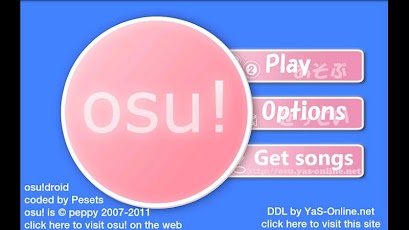
This game is Osu but it is the android version. the gameplay is just the same as the pc,but this one is on android. and you still can download the song,and move your skin or song into your osu directory in your androidscreenshots:

Gameplay video :
>>Download OsuDroid<<
The video above is an evidence that this is not fake, i've tried it too,it is actually working
Installation
- Download .zip file below (.exe (.Net application) for Windows and .apk for Galaxy Note)
- Extract .zip
- Install SPenDigitizer.apk on Galaxy Note
- Launch SPenClient.exe on Windows (Windows will ask you to allow access to Network - you should allow)
- Launch S-Pen Digitizer on your Note
- It should work by default, but for better performance you can change host ip to point directly to your Windows machine
>>Download SpenDigitizer<<
*note: Not only galaxy note or tablet can do this,as long as your android version is 4.0 or more,pretty sure it will work

Raidcall is a software used to voice chat or chatting or group chat and group voice chat. this software is very easy to use,you can download it here, and this software has so many features such as:
 |
Free & Light Setting up is fast and easy; with no need to rent or set up serversLow CPU usage and minimum memory footprint allows for smooth, uninterrupted communication |
 |
Group CommunicationHold up to 10,000 users at a time in a single RaidCall groupHi-Fi quality voice chat from anywhere in the worldFlexible group management systemAdditional features like voice recorder, poll, announcements, activity lo |
 |
Instant MessagingFile transferring and screenshot sharingChat recordsPersonalized themes and Emoticons |
 |
Video BroadcastShare YouTube videos within RaidCall group
Chat within group while watching embedded Twitch and own3D streams |
 |
Social featuresDiscover new online communities based on similar interests, games, and activitiesSynchronize your RaidCall account with your Facebook and invite your friends to join your group |
 |
Fancy FeaturesSpecial speaking modes fit for every occasionOptional reverbs for music effectsModerator systemProcess your voice with soundcard or software media players |
With this app you can play GBA game on android,this is the picture
 What you will need are:
1.>>Download GbaEmu<<
2.>>Download gbabios<<
After you have both file above,do this steps:
1.extract both file (anywhere you like)
2.Install gba emu
3.after you have installed gba emu,launch the app and it will ask you where is the "gbabios" location,and locate it
4.done!,now you can play gba games on your android. enjoy

so that's it ,with this software you can play nds game Downlaod Desmume
After you have download desmume and installed,this is how to setting it:
1.Open Config>wifi settings check infrastructure and from the dropbox choose your cable LAN and then click ok
2.after you done step 1,set the setting like this

Done!,now you can play NDS game from your pc, enjoy!

 )

Utorrent is a software to download file from torrent like from http://thepiratebay.se/ , http://kat.ph/ and any other site.if you want to download files from those site,you will need utorrent
Download utorrent

BlueStacks is a software for computer to run android application and games on your pc.so this is a emulator android for pc. with this software you can play almost all games on the android market!
Screenshots:


(Screenshots)
With notepad++ you can manage your txt,and another file more efficienly,this software is optimized for coding or programming. and in my opinion this is very much better than the normal notepad

K-lite codec is a software to play almost all video format. but if you ask "why not winamp,or etc?", it is because k-lite codec is much easier to use ,its size is small and very easy to use >>DOWNLOAD K-LITE CODEC<<

Paint tool sai is a software used to drawing or for graphic designing, but in my opinion this software is most used to draw manga. that's because most of my friend only use this software for drawing manga,lol. These are some picture of my friend's art:


Download Piant tool sai
and these are the picture that i found in google:
